Introduction
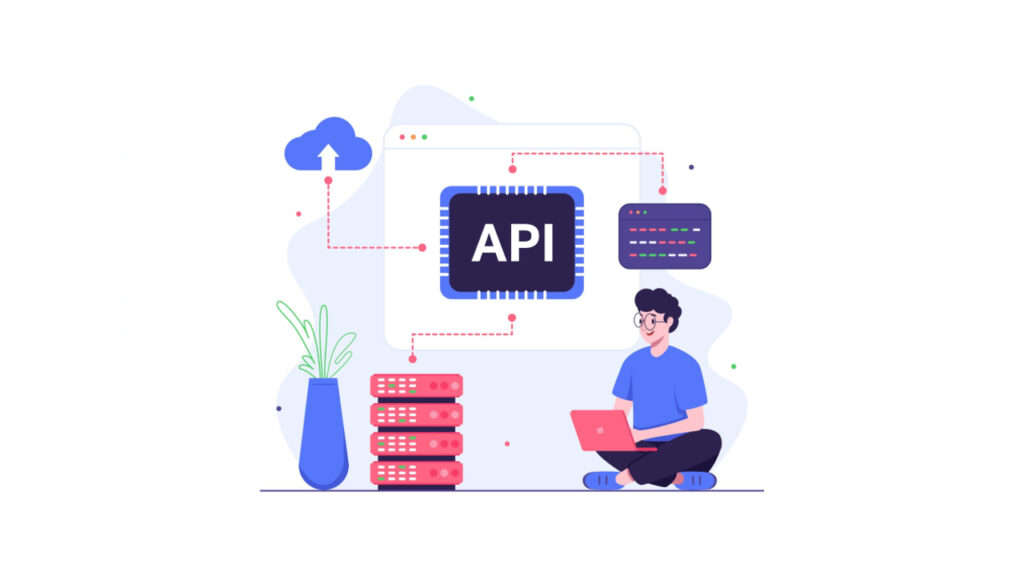
In today’s digital world, APIs are the backbone of modern applications. From mobile apps to enterprise solutions, APIs drive communication between services. For Quality Assurance (QA) engineers, testing APIs effectively is crucial to ensure stability, performance, and accuracy.
This is where Swagger UI comes into play. Swagger UI is an open-source tool that provides an interactive visualization of APIs defined using OpenAPI Specification (OAS). Instead of dealing with raw API documentation in text format, QA engineers can leverage Swagger UI to test, validate, and explore endpoints in a structured and user-friendly way.
In this article, I will provide a comprehensive guide on Swagger UI, covering its benefits, features, setup process, and its role in a QA workflow.
What is Swagger UI?
Swagger UI is part of the Swagger ecosystem, which includes tools such as Swagger Editor, Swagger Codegen, and SwaggerHub. It takes an OpenAPI definition file (YAML or JSON) and generates an interactive interface where users can visualize and test API endpoints.
Key Features of Swagger UI

Why Swagger UI Matters for QA Engineers
As QA engineers, our focus is on ensuring software quality, reliability, and usability. Swagger UI plays a vital role in this process:
1. Efficient Test Execution
- Instead of writing lengthy cURL commands or Postman collections manually, Swagger UI allows testers to run endpoints instantly.
2. Collaboration with Developers
- QA engineers can work with the same API definitions that developers use, ensuring no mismatch between code and testing.
3. Shift-Left Testing
- Swagger UI supports early validation of APIs in the development lifecycle, reducing defects in later stages.
4. Documentation Verification
- QA engineers can confirm that the API documentation matches actual functionality.
Swagger UI vs Traditional API Testing Tools

Setting Up Swagger UI
Swagger UI can be used in different ways:
1. Online Swagger UI
- You can paste your API specification file into the online version available at Swagger’s official site.
2. Local Installation
- Steps to install locally:
- Download the Swagger UI distribution from GitHub.
- Serve the files using a web server (e.g., Node.js, Nginx).
- Open index.html and point it to your API specification file.
3. Integration in Projects
- Many frameworks (Spring Boot, ASP.NET Core, Django) support auto-generation of Swagger UI as part of the API project.
Example OpenAPI Snippet (YAML)
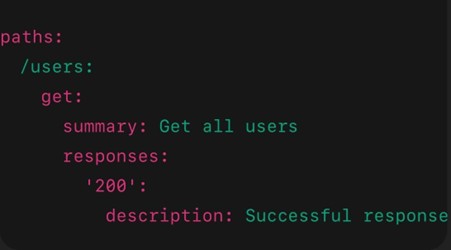
When loaded into Swagger UI, this snippet displays an endpoint GET /users with a “Try it out” button.
Swagger UI in QA Workflows
For QA engineers, Swagger UI is more than just documentation; it’s a testing assistant.
How QA Can Use Swagger UI
- Exploratory Testing: Manually test endpoints to understand behaviour.
- Validation of Inputs/Outputs: Check how the system handles valid, invalid, and edge-case parameters.
- Contract Testing: Ensure API responses adhere to the defined schema.
- Test Data Generation: Swagger UI helps visualize request payloads that can be reused in automated test scripts.
Example Workflow
- Load API specification in Swagger UI.
- Select endpoint → Enter parameters → Execute request.
- Observe response → Verify status code, response time, and data.
- Compare with acceptance criteria.
- Log issues in QA tracking tools (e.g., JIRA).
Table: Common Status Codes Observed in Swagger UI

Advantages, Limitations & Conclusion
Advantages of Swagger UI for QA
- Simplifies API exploration and validation.
- Bridges communication between QA, developers, and business teams.
- Reduces reliance on third-party tools for basic API checks.
- Ensures real-time testing against live APIs.
Limitations of Swagger UI

Conclusion
For QA engineers, Swagger UI is not just a documentation tool but a critical enabler of quality validation in API testing. It improves collaboration, reduces testing effort, and ensures clarity in API behaviour. While it may not replace full-fledged testing frameworks, it acts as a foundation for API exploration, functional validation, and early defect detection.
As QA practices evolve, adopting tools like Swagger UI ensures that testing is faster, smarter, and more reliable.