
Introduction
The evolution of Robotic Process Automation from isolated scripts to Enterprise Solution Architecture necessitates a fundamental shift in deployment methodology. When a Center of Excellence scales, the primary challenge is rarely the development itself but the complexity of moving code from a developer’s machine to a production environment. Whether managing traditional rules-based RPA or the next generation of Agentic Automation, the deployment strategy determines the stability of the entire ecosystem.
The core advantage of using UiPath Pipelines within Automation Ops is the complete removal of the technical overhead typically associated with CI/CD. In traditional setups like GitHub Actions or Azure DevOps, CoE must invest significant time into writing and maintaining complex YAML files and custom shell scripts. With native pipelines, that entire layer of manual scripting is eliminated. There is no need to worry about CLI updates or debugging pipeline code because the logic is already baked into the platform.
Architecture
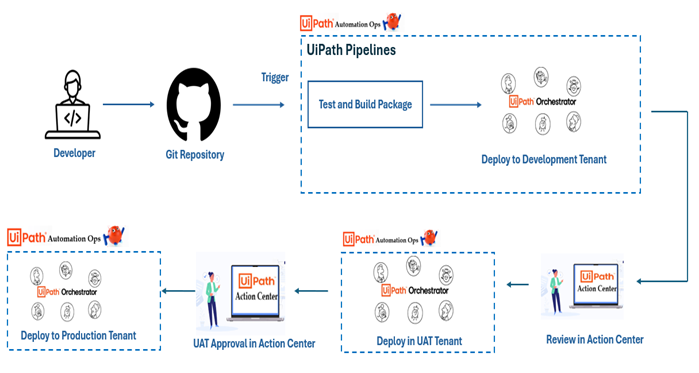
How UiPath Pipelines Work
A major differentiator for the CoE is the seamless integration with Orchestrator. Easily managing processes, assets, and queues within the ecosystem makes deployments smoother, while the control offered by Automation Ops adds a vital layer of governance. Furthermore, using UiPath Action Center for release approvals ensures that every deployment fits within the established ecosystem and undergoes human-in-the-loop validation before going live.
Source Control Integration
Pipelines connect to repositories and whenever a developer commits code, the pipeline can be triggered automatically.
Pipeline Processes
A pipeline consists of predefined or custom processes, such as:
- Build and Publish to compile and deploy automation
- Run Tests for Validating workflows
- Update Process for deploying new versions
- Approval-based Promotion to add governance steps
Pipeline flow
Clone → Analyze → Build → Test → Publish → Deploy
Execution via Robots
Each pipeline runs as a job in Orchestrator using an unattended robot in a configured pipeline runtime environment
Trigger Mechanisms
Pipelines can be triggered automatically on every code commit also manually on demand
This enables continuous delivery of automation updates.
Flexible Backend Architecture
A mature CoE requires a deployment engine that can adapt to the underlying code structure without custom configuration.
For standalone processes, the pipeline functions as a high-speed delivery vehicle that pulls the code, runs the Workflow Analyzer, and pushes the package to Orchestrator.
For complex Solutions involving Agentic workflows, the solution deployment feature allows the CoE to manage multiple processes together. The pipeline does not just move a file, it synchronizes the workflows along with the metadata for Assets, Queues, Storage Buckets, and Agentic triggers as one unified, versioned unit.
Customization Without Complexity
While the system removes the need for advanced DevOps expertise, it does not sacrifice flexibility. The ability to edit the pipeline code directly means the CoE can customize deployments to ensure they are tailored exactly to specific business needs. If code needs to move across branches, the system allows for leveraging GitHub Activities for automated merging, combining the best of traditional version control with RPA-specific automation.
Orchestrator-Centric Execution
Generic CI/CD tools treat automation code as generic data. Native pipelines execute as jobs using unattended robots already established within the Orchestrator infrastructure. This ensures that the deployment environment is governed by the same machine templates and security protocols as the production runtime. The process is not merely moving files, it is executing a deployment within the specific infrastructure designed to host the automation.
Reliability and Support
Perhaps the most practical advantage is the accessibility of the tool. UiPath Pipelines are designed specifically for RPA teams, meaning developers can manage their own lifecycles without a dedicated DevOps department. Additionally, having direct support from the UiPath team ensures that the deployment engine itself is a covered, enterprise-grade product, providing peace of mind that manual scripts simply cannot offer.
The Strategic Goal
The objective for any Center of Excellence is to move away from crafting automations and toward industrializing them. By centralizing the deployment logic within governed, automated pipelines, the organization eliminates human error, ensures a perfect audit trail, and creates a predictable foundation for the future of intelligent automation.
Real-World Use Case
Imagine a team building invoice automation:
- Developer updates workflow in GitHub
- Pipeline triggers automatically
- Automation is built and tested
- Review and Approval managed via UiPath Action center
- Package is deployed to production
- Logs are generated for monitoring
Result: Zero manual deployment effort + faster delivery
Conclusion
UiPath Pipelines are a powerful step toward industrializing automation development. By integrating CI/CD into RPA, organizations can deliver automations faster, maintain higher quality, scale automation programs effectively.
In short, UiPath Pipelines transform automation from ad-hoc scripts into structured, enterprise-grade software delivery systems.