Introduction
- RPA testing and traditional software testing share the same core goal — ensuring that systems behave as expected.
- They differ significantly in scope, constraints, tooling, and operational realities.
- RPA testing focuses on validating bots that perform UI-driven actions and interact with multiple heterogeneous systems such as legacy, web, desktop, and document-centric workflows.
- Traditional software testing typically targets a single application or service, usually with stable interfaces, strong CI/CD pipelines, and development team ownership.
- This article highlights differences across key areas including lifecycle, test design, test environments, test data characteristics, non-functional requirements, governance & risk, and DevOps maturity.
- It also includes practical elements such as checklists, real-world examples, and a detailed comparison table.
- Purpose: Help QA teams choose the right strategy for both RPA testing and traditional testing contexts.
1. Definitions & Scope
- RPA Testing: Validation of software robots that emulate human actions on UIs and documents to execute a business process. Scope includes UI selectors, orchestration (scheduling, queues), exception handling, and integration with enterprise apps.
- Traditional Software Testing: Validation of applications, services, or APIs typically owned by engineering teams with access to source code or stable interfaces. Focus spans unit, API, UI, and system testing within a defined product boundary.
2. Lifecycle & Tooling
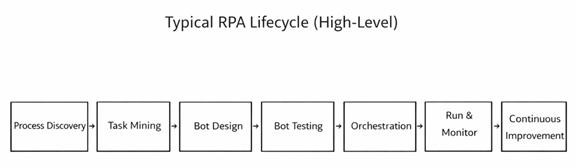
RPA programs include discovery (process/task mining), design in RPA studios (e.g., UiPath, Automation Anywhere, Blue Prism), and orchestration via control rooms/Orchestrator. Testing leverages built-in test capabilities and external frameworks. Traditional delivery relies on version control, build servers, and test frameworks tightly integrated with developer workflows.
3. Test Strategy & Design
- RPA test design emphasizes UI selector resilience, data-driven paths, and exception-first design. Negative cases must simulate pop-ups, latency, format changes, and OCR inaccuracies.
- Traditional testing emphasizes unit tests, API contracts, and deterministic environments, using mocks and service virtualization to control dependencies.
4. Environments & Data
- RPA test environments often mirror production UIs but may suffer from shared or unstable endpoints (e.g., VDI, Citrix). Test data is volatile: emails, documents, and spreadsheets evolve.
- Synthetic but realistic datasets and seeded inboxes are critical. Traditional environments are typically versioned and containerized with seeded databases and repeatable resets.
5. Non-Functional Testing
- Beyond correctness, RPA must meet operational SLAs (queue latency, bot utilization, run-time variability). Performance tests should model peak volumes, OCR throughput, and screen-render delays.
- Traditional NFRs often focus on API latency, throughput, resource usage, and resilience under fault injection.
6. Governance & Risk
- RPA risk centers on business process drift, selector brittleness, credential handling, and unattended bot safety. Governance includes change control for target applications outside the bot team’s ownership.
- Traditional governance relies on SDLC gates, secure coding, and change advisory boards with clearer system boundaries.
7. CI/CD and Observability
- Maturing RPA practices adopt Git-based versioning, code reviews, static checks for workflows, and test suites in pipelines. Observability leans on centralized logs, screenshots, video capture, and business-level KPIs.
- Traditional pipelines are mature: build > test > deploy with unit coverage gates, API tests, and distributed tracing for microservices.
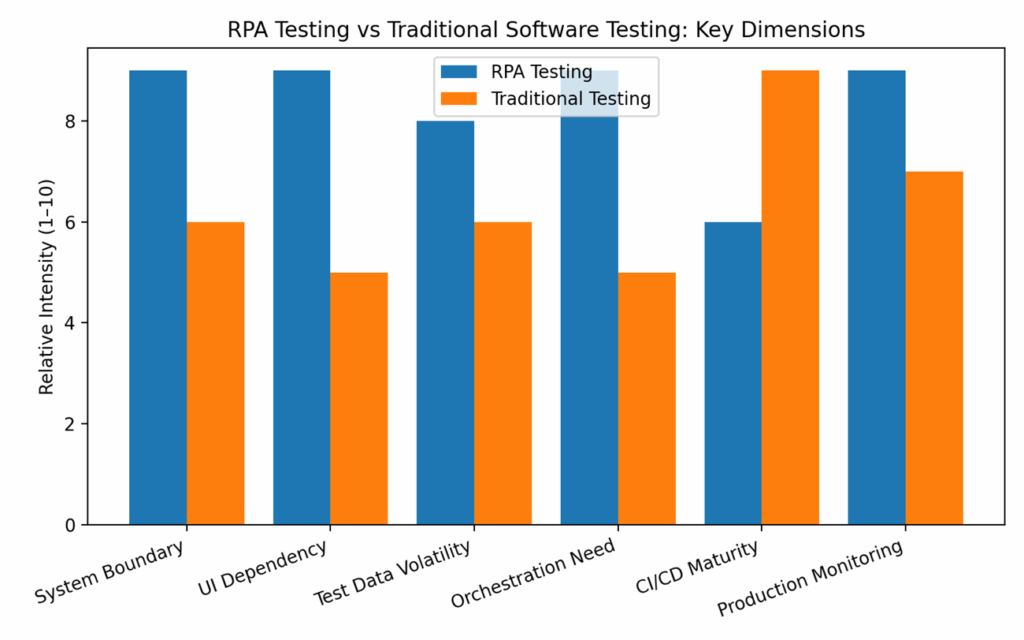
8. Side-by-Side Comparison Table
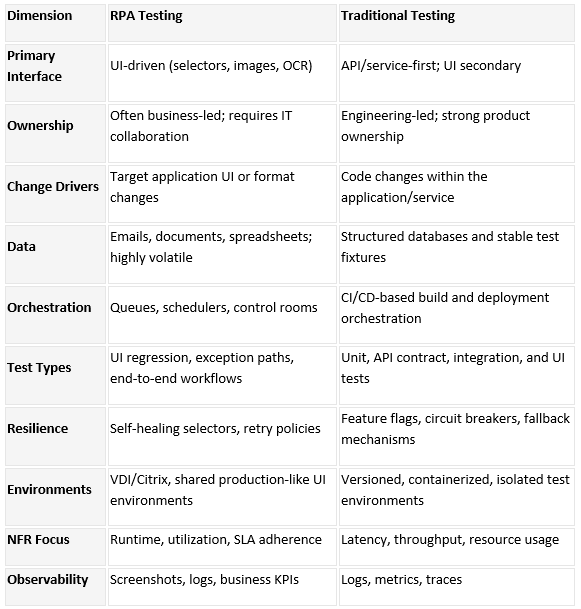
9. Use Case Briefs
- Case 1: Invoice Processing Bot
- Problem: OCR accuracy drops when vendors change invoice templates.
- Test Focus: Template variation suites; golden images; confidence thresholds; exception routing.
- Outcome: 30% reduction in production exceptions after adding negative tests and selector hardening.
- Case 2: HR Onboarding Bot
- Problem: Target SaaS updated UI quarterly.
- Test Focus: Visual diffs; self-healing selector rules; smoke tests post-release.
- Outcome: MTTR for bot fixes down from 2 days to 6 hours with proactive regression runs.
10. Practitioner Checklists
- RPA Test Readiness Checklist
- Defined selectors with fallback strategies (attributes, anchors, images)
- Data libraries with realistic documents/emails and edge cases
- Exception taxonomy and business rules for routing
- Environment access patterns (VDI/Citrix) documented
- Orchestrator queues seeded with test items
- Observability: screenshots, logs, and KPI capture enabled
Appendix: Terms & Acronyms
RPA: Robotic Process Automation
OCR: Optical Character Recognition
NFR: Non-Functional Requirements
SLA: Service Level Agreement
MTTR: Mean Time to Recovery